
AI Tools for Software Development
By Joshua Harris, Data Engineer, Australian Biocommons
The landscape of AI-assisted development has expanded considerably, and with it, the number of tools competing for a place in our workflows. Having spent time working across many of these tools, I've found it useful to categorise them into four distinct groups, each with its own trade-offs in context awareness, precision, and control. In this blog I share how I approach selecting the right tool for particular software development tasks.
Dedicated Applications
These are standalone products that run in the browser, tools like ChatGPT, Perplexity, Gemini, and Claude. They operate in their own environment, disconnected from your codebase. Context awareness is low because you must provide all context manually, uploading files, describing your project structure, and framing the problem from scratch each session. Manual control and review is similarly limited since interaction occurs within a browser window with no line-level editing, and any code changes require copying and pasting entire blocks back into your Integrated Development Environment (IDE).
That said, these tools have genuine strengths.

Strengths and weaknesses of Dedicated Applications
They are effective for brainstorming and exploratory research, and many are connected to web APIs, allowing them to surface current information from the web. They also tend to be the most accessible and lowest cost entry point into AI-assisted development. The trade-off is that zero codebase context and the manual transfer of code introduces friction, and there is poor precision when it comes to understanding exactly what has changed in a given snippet.
CLI-Based tools
Tools like OpenAI Codex, Claude Code, and Gemini CLI are installed directly on the command line. They're considerably more code-focused than their browser-based counterparts. Context awareness is high because you can direct these tools to specific directories, and they can traverse your file system to build an understanding of the project. Manual control and review sits at a medium level. CLI tools tend to operate in an agentic manner, making broad changes across files, but those changes are visible in your IDE, which does allow for review. These tools are IDE-agnostic and deployable in virtually any environment, which makes them particularly versatile.

Strengths and weaknesses of CLI-based tools
They can write scripts and automate specific AI-driven tasks, providing a granular level of control over what the agent does. However, maintaining control over the agent's behaviour can be difficult when changes span multiple files. Rolling back often requires Git, which may become cumbersome, and inline feedback is less visible compared to approaches that live inside the editor itself.
IDE Plugins and Extensions
This category includes tools like AWS CodeWhisperer, GitHub Copilot, OpenAI Codex (as a plugin), and Gemini Code Assistant, all of which integrate directly into your existing IDE. Context awareness tends to sit at a low to medium level. These tools typically have awareness of the file you're currently editing, or specific files you reference, but they don't usually index the broader project. Manual control and review, however, is high. Suggestions appear inline, right where you're working, and the accept-reject workflow is minimally disruptive. You might use it to clean up a line, fix a syntax error, or complete a function signature without breaking your flow.

Strengths and weaknesses of IDE plugins and extensions
The inline workflow is the key advantage here. It allows AI assistance to integrate naturally into the act of writing code, rather than requiring a context switch, and that minimal disruption makes it one of the most fluid ways to work with AI day to day. The limitation is that understanding remains shallow. Multi-file context is restricted, which means these tools are best suited for in-the-moment assistance within a single script rather than reasoning across an entire project's architecture.
AI-Native IDEs
Tools like Cursor and Windsurf represent a fundamentally different approach. They embed AI capabilities directly into the IDE and index the entire codebase by creating a vector store of embeddings across all project files. Context awareness is very high because everything is indexed, including documentation folders, module structures, and function relationships. This means the AI has a deep understanding of how components relate to one another and can leverage that context when generating or modifying code. Manual control and review is also very high. Changes can be rolled back with a single click, without requiring Git. You can run code, test it, and revert, all within the IDE. A Git diff-based review interface makes it straightforward to see exactly what has been modified.

Strengths and weaknesses of AI-native IDEs
The combination of deep codebase understanding, inline accept-reject workflows, and effortless rollback makes these tools particularly powerful. Documentation generation also benefits significantly from this level of context awareness. The trade-offs are worth noting though. The blast radius of an AI agent in these environments can be large, particularly in complex monolithic repositories where the agent may modify files you hadn't intended to change. There are strategies to mitigate this, but it requires deliberate scoping. Cost is also a consideration. These IDEs operate on credit-based systems, and heavy AI usage can deplete those credits quickly.
Final thoughts
Having worked across all four categories, my priorities when selecting AI tooling for development are clear: control, precision, and high context. I want to know that any AI-generated change can be rolled back. I want to see exactly where a modification has been made in the source code, not as an abstracted diff in a browser window, but as a visible, reviewable edit in my working environment. These three properties, the ability to revert, the ability to inspect, and the depth of understanding the AI brings, are what ultimately accelerate a development workflow. The tooling landscape will continue to evolve, but those criteria are likely to remain fundamental to productive AI-assisted development.
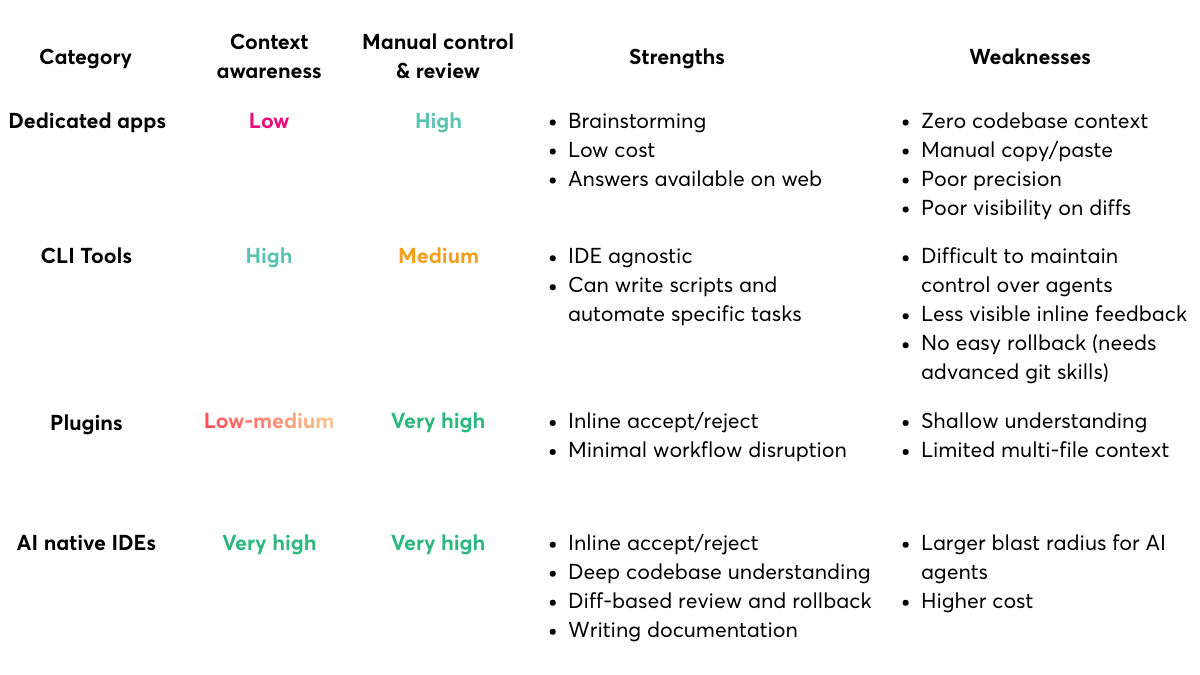
Comparison of AI tools for developers